HTML Ordered List 'ol' Tag/Element
Q
What Is an "ol" Tag/Element?
✍: FYIcenter.com
A
 An "ol" element is block level element that can be used to define
an ordered list, where items are displayed with leading sequential numbers.
Here are basic rules about "ol" elements:
An "ol" element is block level element that can be used to define
an ordered list, where items are displayed with leading sequential numbers.
Here are basic rules about "ol" elements:
- "ol" elements are block level elements.
- "ol" elements can not have text contents.
- An "ol" element must have one or more "li" elements as sub-elements.
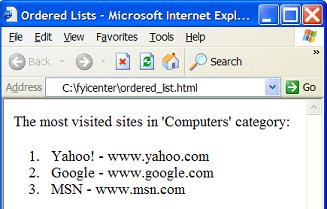
- Each "li" element will be displayed by browsers as a paragraph with a leading number to represent the position of this "li" element in its parent "ol" element.
Below is a good tutorial example of "ol" elements:
<?xml version="1.0" ?>
<!DOCTYPE html PUBLIC "-//W3C//DTD XHTML 1.0 Strict//EN"
  "http://www.w3.org/TR/xhtml1/DTD/xhtml1-strict.dtd">
<html>
 <head>
  <title>Ordered Lists</title>
 </head>
 <body>
  <p>The most visited sites in 'Computers' category:</p>
  <ol>
  <li>Yahoo! - www.yahoo.com</li>
  <li>Google - www.google.com</li>
  <li>MSN - www.msn.com</li>
  </ol>
 </body>
</html>
If you save the above document as ordered_list.html, and view it with Internet Explorer, you will see a list of items with leading sequential numbers as shown below:
2017-06-16, 1416🔥, 0💬
Related Topics:
