Highlight Part of a Paragraph in HTML
Q
How To Highlight One Part of a Paragraph?
✍: FYIcenter.com
A
 If you want to highlight one part of a paragraph, you can use the
"strong" element with the "p" element.
Below is a good tutorial example of using "strong" elements:
If you want to highlight one part of a paragraph, you can use the
"strong" element with the "p" element.
Below is a good tutorial example of using "strong" elements:
<?xml version="1.0" ?>
<!DOCTYPE html PUBLIC "-//W3C//DTD XHTML 1.0 Strict//EN"
  "http://www.w3.org/TR/xhtml1/DTD/xhtml1-strict.dtd">
<html>
 <head>
  <title>Using "strong" in a Paragraph</title>
 </head>
 <body>
  <p>I love to use <strong>dev.FYIcenter.com</strong>
  to learning XHTML. It is easy and fun.</p>
 </body>
</html>
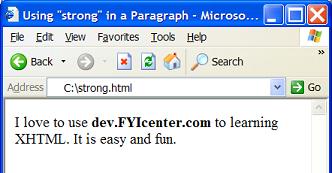
If you save the above document as strong.html, and view it with Internet Explorer, you will see that dev.FYIcenter.com is highlighted in bold within the paragraph as shown below:
⇒ Getting Extra Space between Paragraphs in HTML
⇐ Controlling Line Breaks in a Paragraph in HTML
2023-08-03, ∼1995🔥, 0💬
Related Topics:
