Login to Developer Portal as Publisher
How to login to the Developer Portal internally by you as the publisher?
✍: FYIcenter.com
 Normally, the Developer Portal of an Azure API Management Service is used by client developers.
But as a publisher, you can also use the Developer Portal to test API operations internally.
Normally, the Developer Portal of an Azure API Management Service is used by client developers.
But as a publisher, you can also use the Developer Portal to test API operations internally.
You can follow this tutorial to login and access the Developer Portal:
1. Go to https://portal.azure.com with a Web browser. And log in with your company email address. You see to the dashboard page of the Azure portal.
2. Click "All Resources" in the menu. And find your API Management Service resource from the resource list.
3. Click on API Management Service resource name to open it.
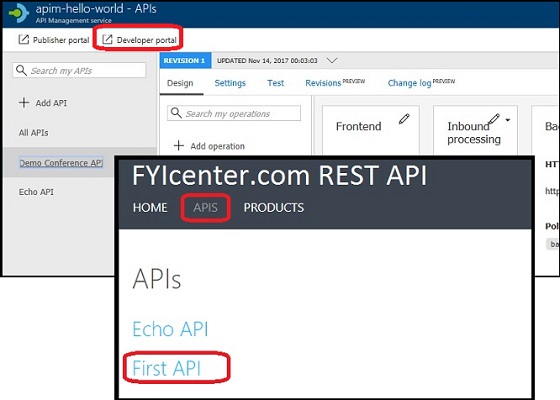
4. Click on the "Developer portal" link near the top. You will be landed on the developer portal page in a new window as a publisher.
5. Click on the "API" tab. You see a list of APIs that are included in "Starter" and "Unlimited" API products.
6. Click "First API". You see a list of operations of this API and the test page for the first operation.
The picture below shows you steps to the Developer Portal as a Publisher:
⇒ What Can I See on Developer Portal
⇐ Using Azure API Management Developer Portal
2017-09-20, ∼4445🔥, 0💬
Related Topics:
