Add API Operation Request Body Examples
How to add request body examples to my Azure API operation to make it more user friendly?
✍: FYIcenter.com
 If you have created the "First API" API and "Add new user" operation
as described in previous tutorials,
you can follow this tutorial to add request body examples.
If you have created the "First API" API and "Add new user" operation
as described in previous tutorials,
you can follow this tutorial to add request body examples.
1. Go to the publisher dashboard of the API Management Service.
2. Open the "First API" and open the operation "Add new user".
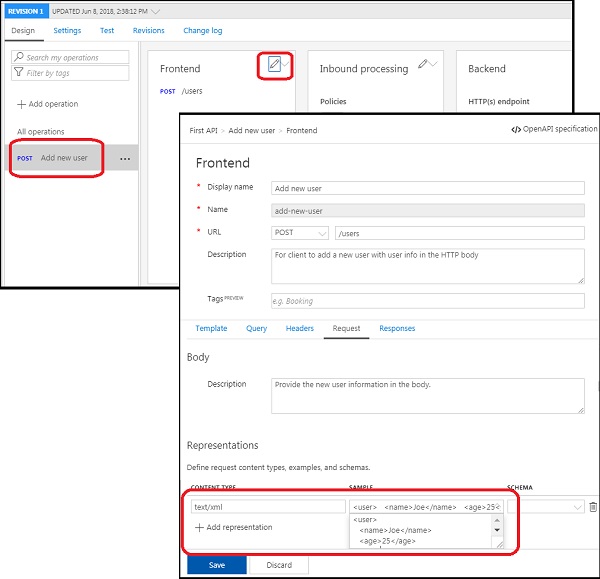
3. Click "Edit" icon in the "Frontend" section. You see a list of settings and tabs.
4. Click "Request" tab. You see configurations for the request of the operation.
5. Fill in each field with the following:
Description: Provide the new user information in the body.

Add representation
   text/xml

      <user>
         <name>Joe</name>
         <age>25</age>
      </user>
6. Click the "Save" button. The API operation is updated.
7. Click "Add representation" to add more examples, like:
application/json
   {
       "user": {
           "name": "Joe",
           "age": "25"
       }
   }
The picture below shows you steps on how to add request body examples on an API operation:
⇒ Test API Operation Request Body Examples
⇐ Making API More User Friendly
2018-03-28, ∼6469🔥, 0💬
Related Topics:
