3Pigs2-3.1.epub - Multiple XHTML Files
Can I divide the book content into multiple XHTML files?
✍: FYIcenter.com
 Yes, you can divide the book content into multiple XHTML files.
If your has multiple chapters, you should consider to
create one XHTML file per chapter.
Yes, you can divide the book content into multiple XHTML files.
If your has multiple chapters, you should consider to
create one XHTML file per chapter.
For example, you can download this EPUB book, 3Pigs2-3.1.epub, which has "The Three Little Pigs" story coded in 4 XHTML files:
The-Opening.xhtml
First-Pig.xhtml
Second-Pig.xhtml
Third-Pig.xhtml
The navigation.xhtml can be improved to give 4 entries:
<?xml version="1.0" encoding="utf-8"?>
<html xmlns="http://www.w3.org/1999/xhtml"
  xmlns:epub="http://www.idpf.org/2007/ops">
  <head>
    <title>The Three Little Pigs</title>
  </head>
  <body>
    <h3>The Three Little Pigs</h3>
    <nav epub:type="toc">
      <ol>
        <li><a href="/The-Opening.xhtml">The Opening</a>
        </li>
        <li><a href="/First-Pig.xhtml">The First Pig</a>
        </li>
        <li><a href="/Second-Pig.xhtml">The Second Pig</a>
        </li>
        <li><a href="/Third-Pig.xhtml">The Third Pig</a>
        </li>
      </ol>
    </nav>
  </body>
</html>
Of course, the package.opf needed be updated too:
<?xml version="1.0" encoding="UTF-8"?>
<package xmlns="http://www.idpf.org/2007/opf" version="3.0"
  unique-identifier="id">
  <metadata xmlns:dc="http://purl.org/dc/elements/1.1/"
    xmlns:dcterms="http://purl.org/dc/terms/">
    <dc:title>The Three Little Pigs</dc:title>
    <dc:identifier id="id">fyicenter.com.epub.3Pigs2-3.1</dc:identifier>
    <dc:language>en-US</dc:language>
    <meta property="dcterms:modified">2018-04-01T00:00:00Z</meta>
  </metadata>
  <manifest>
    <item id="navigation" href="/navigation.xhtml"
      media-type="application/xhtml+xml" properties="nav"/>
    <item id="The-Opening" href="/The-Opening.xhtml" media-type="application/xhtml+xml"/>
    <item id="First-Pig" href="/First-Pig.xhtml" media-type="application/xhtml+xml"/>
    <item id="Second-Pig" href="/Second-Pig.xhtml" media-type="application/xhtml+xml"/>
    <item id="Third-Pig" href="/Third-Pig.xhtml" media-type="application/xhtml+xml"/>
  </manifest>
  <spine>
    <itemref idref="navigation" linear="no"/>
    <itemref idref="The-Opening"/>
    <itemref idref="First-Pig"/>
    <itemref idref="Second-Pig"/>
    <itemref idref="Third-Pig"/>
  </spine>
</package>
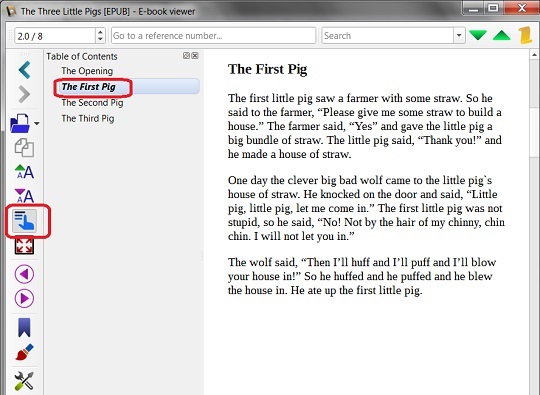
If you open 3Pigs2-3.1.epub in Calibre, you see "The Three Little Pigs" story displayed one chapter at a time.
If you click the navigation icon on the left,
you see the navigation area opened:
⇒ 3Pigs3-3.1.epub - Add Images
⇐ 3Pigs1-3.1.epub - Single XHTML File
2019-01-12, ∼2937🔥, 0💬
Related Topics:
