3Pigs7-3.1.epub - Apply CSS File
Q
How to add CSS file to my EPUB book?
✍: FYIcenter.com
A
 You can follow this tutorial to add a CSS file to your EPUB 3.1 book.
1. Create a CSS file, Styles.css, to control display styles of all XHTML pages:
body {font-family: "Arial";}
pre {padding: 0px 25px 0px 25px;
  font-family: "Arial"; font-style: italic; font-size: 14pt;}
figure {text-align: center;}
2. Add Styles.css to all XHTML content files. For example,
<?xml version="1.0" encoding="utf-8"?>
<html xmlns="http://www.w3.org/1999/xhtml">
  <head>
    <title>The Third Pig</title>
  <link rel="stylesheet" href="/Styles.css" type="text/css"/>
  </head>
  <body>
<h3>The Third Pig</h3>
...
3. Add Styles.css to package.opf:
  ...
  <manifest>
    ...
    <item id="Copyright" href="/Copyright.xhtml" media-type="application/xhtml+xml"/>
    <item id="Figure-1" href="/The-Three-Little-Pigs-by-J-Jacobs.png" media-type="image/png"/>
    <item id="Styles" href="/Styles.css" media-type="text/css"/>
  </manifest>
  ...
ZIP all files together to created 3Pigs7-3.1.epub.
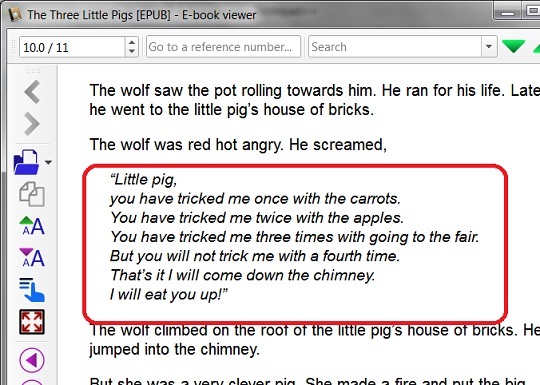
Now open 3Pigs7-3.1.epub in Calibre and go to "pre" section.
You see the "pre" lines are displayed differently:
⇒ Introduction of EPUB 3.2 Specification
⇐ 3Pigs6-3.1.epub - XHTML pre Element
2018-12-26, ∼2914🔥, 0💬
Related Topics:
