Basic Sample Business Network - SampleTransaction
How to submit SampleTransaction request to Basic Sample Business Network?
✍: FYIcenter.com
 You can follow this tutorial to submit SampleTransaction request to
Basic Sample Business Network.
You can follow this tutorial to submit SampleTransaction request to
Basic Sample Business Network.
1. Open Hyperledger Composer Playground and go to Basic Sample Business Network home page, as shown in the previous tutorial.
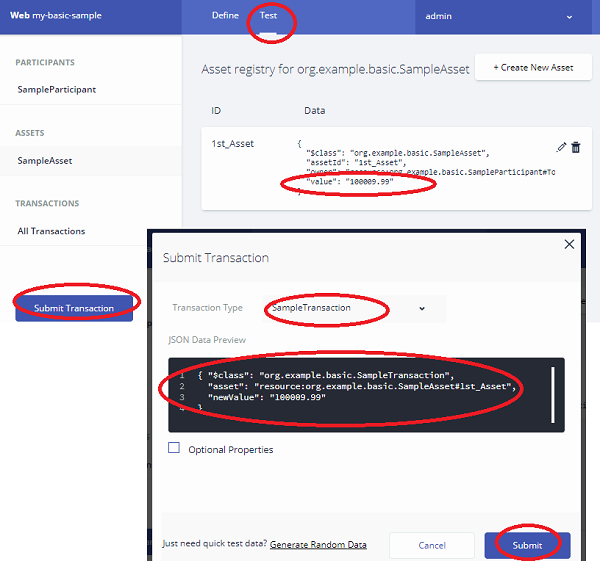
2. Click "Test" tab. You see the test home page.
3. Click "SampleAsset" in the ASSETS section on the left. You see a list of SampleAsset records.
4. Click "Submit Transaction" button on the left. You see the input form to create new asset.
5. Copy and paste the following JSON message. Note that the "asset" attribute needs to point to an existing SampleAsset record: "resource:org.example.basic.SampleAsset#1st_Asset".
{ "$class": "org.example.basic.SampleTransaction",
  "asset": "resource:org.example.basic.SampleAsset#1st_Asset",
  "newValue": "100009.99"
}
6. Click "Submit". You see the value changed on the "1st_Asset" record.
Â
⇒ Basic Sample Business Network - SampleEvent
⇠Basic Sample Business Network - SampleAsset
2020-12-22, ∼1553🔥, 0💬
Related Topics:
