Deploy Business Network Archive (BNA) to Playground
How to deploy a Business Network Archive (BNA) file to Hyperledger Composer Playground?
✍: FYIcenter.com
 If you have an existing Business Network Archive (BNA) file
that contains a Hyperledger Composer Business Network application,
you can follow this tutorial to deploy it to the
Hyperledger Composer Playground.
If you have an existing Business Network Archive (BNA) file
that contains a Hyperledger Composer Business Network application,
you can follow this tutorial to deploy it to the
Hyperledger Composer Playground.
1. Open Hyperledger Composer Playground. You see a list of Business Networks connected to the Hyperledger Fabric simulator in the Web browser.
2. Click the "+" icon at the end of the list. You the "Deploy New Business Network" screen.
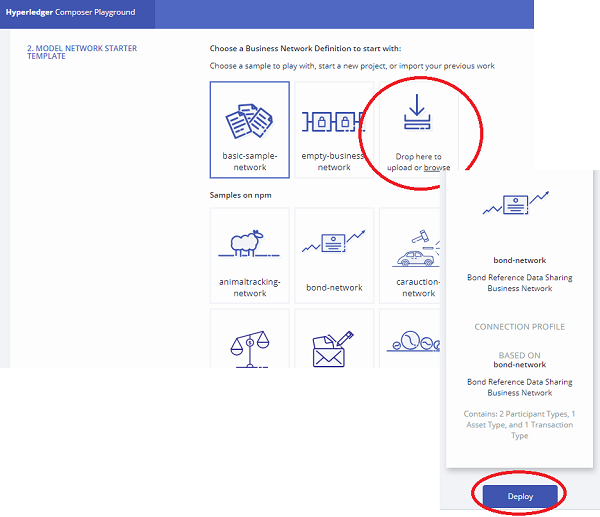
3. Scroll down to the "MODEL NETWORK STARTER TEMPLATE" section.
4. Drag and drop your Business Network Archive (BNA) file to the "Drop here to upload or browse" icon. The BNA file will uploaded and the summary of the network will be displayed in the top right corner.
5. Click "Deploy". The uploaded business network will be deployed to the playground and ready for you to test.
Â
⇒ Business Network Development Concepts
⇠Install Demo Business Networks in Playground
2020-12-15, ∼1817🔥, 0💬
Related Topics:
