XML to JSON Conversion at utilities-online.info
How to use the XML to JSON Conversion Tool at utilities-online.info?
✍: FYIcenter.com
 If you want to try the XML to JSON Conversion Tool at utilities-online.info,
you can follow this tutorial:
If you want to try the XML to JSON Conversion Tool at utilities-online.info,
you can follow this tutorial:
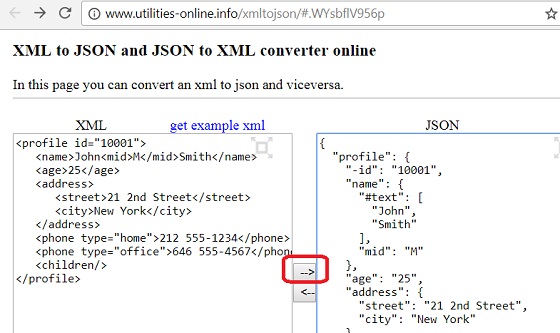
1. Go to the XML to JSON Conversion Tool page at utilities-online.info.
2. Enter the following XML document in the XML text area on the left:
<profile id="10001">
   <name>John<mid>M</mid>Smith</name>
   <age>25</age>
   <address>
      <street>21 2nd Street</street>
      <city>New York</city>
   </address>
   <phone type="home">212 555-1234</phone>
   <phone type="office">646 555-4567</phone>
   <children/>
</profile>
3. Click the right arrow button to convert it to JSON. You see the following output in the JSON text area on the right:
{
  "profile": {
    "-id": "10001",
    "name": {
      "#text": [
        "John",
        "Smith"
      ],
      "mid": "M"
    },
    "age": "25",
    "address": {
      "street": "21 2nd Street",
      "city": "New York"
    },
    "phone": [
      {
        "-type": "home",
        "#text": "212 555-1234"
      },
      {
        "-type": "office",
        "#text": "646 555-4567"
      }
    ]
  }
}
Note that the conversion used some implicit rules:
- An XML attribute is converted into a JSON name and value pair,
with "-" added to the attribute name.
- Repeating XML elements are converted into a JSON Array.
- "#text" is used to name XML text content, if needed.
- Scattered text contents are aggregated to a single JSON Array.
- Empty XML element is incorrectly converted to nothing.
So the XML to JSON conversion tool at utilities-online.info is not good, because it truncates empty elements.
The picture below shows you how to use the online XML to JSON conversion tool at utilities-online.info:
⇒ XML to JSON Conversion at freeformatter.com
2018-03-18, ∼3869🔥, 0💬
Related Topics:
