'rowspan' - Merging Cells HTML Table Columns
Q
How To Merge Cells in a Column?
✍: FYIcenter.com
A
 If you want to merge multiple cells vertically in a row, you need to use
the "rowspan" attribute of in a "td" element. "rowspan" allows you to specify
how many cells you want to merge into this cell vertically.
If you want to merge multiple cells vertically in a row, you need to use
the "rowspan" attribute of in a "td" element. "rowspan" allows you to specify
how many cells you want to merge into this cell vertically.
Below is a tutorial example of merging cells vertically:
<?xml version="1.0" ?>
<!DOCTYPE html PUBLIC "-//W3C//DTD XHTML 1.0 Strict//EN"
  "http://www.w3.org/TR/xhtml1/DTD/xhtml1-strict.dtd">
<html>
 <head>
  <title>Cell Merging in a Column</title>
 </head>
 <body>
  <table border="1" width="400"
   style="background-color: #eeeeee">
   <caption>Online Order</caption>
   <tr>
    <th align="left">Description</th>
    <th align="right">Qty</th>
    <th align="right">Price</th>
    <th align="left">Note</th>
   </tr>
   <tr>
    <td>Email Account</td>
    <td align="right">10</td>
    <td align="right">$9.90</td>
    <td align="left" rowspan="3">
     <small><sub>Order lines</sub></small></td>
   </tr>
   <tr>
    <td>FYIcenter.com Ad</td>
    <td align="right">1</td>
    <td align="right">$99.00</td>
   </tr>
   <tr>
    <td>1-year Access</td>
    <td align="right">1</td>
    <td align="right">$199.00</td>
   </tr>
   <tr>
    <td colspan="2" align="right">Shipping</td>
    <td align="right">$3.99</td>
    <td align="left" rowspan="2">
     <small><sub>Shipping & tax</sub></small></td>
   </tr>
   <tr>
    <td colspan="2" align="right">Tax</td>
    <td align="right">$15.99</td>
   </tr>
  </table>
 </body>
</html>
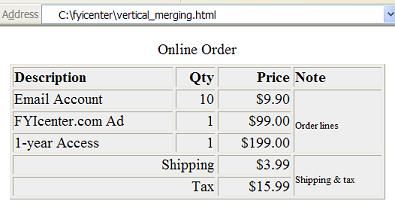
If you save the above document as vertical_merging.html, and view it with Internet Explorer, you will see that column 4 has some cells merged vertically as shown below:
2023-12-25, ≈27🔥, 3💬
Related Topics:
